WaitForSeconds vs WaitForSecondsRealtime, they’re not interchangeable. WaitForSeconds respects Time.timeScale so it pauses when the game pauses, perfect for gameplay timers and cooldowns.
In Unity, WaitForSeconds and WaitForSecondsRealtime look nearly identical but behave completely differently when you pause the game. WaitForSeconds respects Time.timeScale, when you set Time.timeScale to 0, anything waiting on WaitForSeconds pauses too. This is perfect for gameplay timers, ability cooldowns, enemy attack patterns, and damage-over-time effects. They all naturally freeze without extra code.
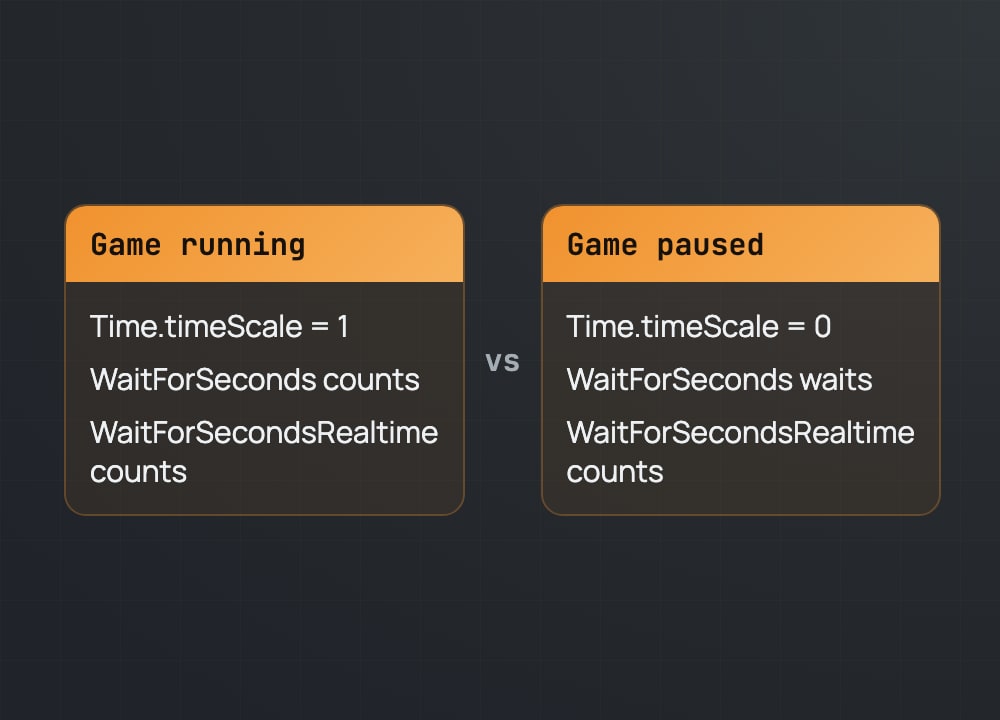
WaitForSecondsRealtime ignores Time.timeScale entirely. It waits for actual wall-clock time. This is what you need for UI – your pause menu fade-in, loading screens, and splash screen delays should never freeze, even if the game is paused. Without it, your UI hangs while game time is stopped.
The rule is simple: if it’s part of gameplay (timers, delays, cooldowns), use WaitForSeconds. If it’s UI (transitions, overlays, menus), use WaitForSecondsRealtime. Pick the right one and your pause system works instantly from the first test.
Read the full breakdown at studios.artanode.com
#gamedev #unity #unity3d #unitytips #csharp #indiedev #gameprogramming #learntocode